Most B2B outreach campaigns fail before the first email is even sent because the technical foundation is built on sand. You've likely felt the anxiety of staring at DNS settings or worrying that a single mistake might burn your primary domain forever. It's a valid concern. In 2026, inbox providers are more aggressive than ever; a simple "set it and forget it" approach no longer works for high-growth teams.
This Deeplead onboarding checklist changes that. We've stripped away the marketing fluff to give you a minimalist, step-by-step path to a fully operational outbound engine. You'll learn how to secure your infrastructure, warm up your inboxes, and build high-intent lead lists ready for AI personalization. By following this guide, you can move from a blank account to a predictable pipeline in under an hour. We'll start with the technical essentials and move directly into launching your first high-performance campaign using this all-in-one platform.
Key Takeaways
- Secure your deliverability by configuring secondary domains and essential DNS records like SPF, DKIM, and DMARC to protect your primary brand.
- Identify high-intent targets with the AI Lead Explorer to ensure your outreach is fueled by accurate, signal-based data.
- Follow this comprehensive Deeplead onboarding checklist to transition from a blank account to a functional, warmed-up sending engine in under an hour.
- Leverage AI placeholders and automated responders to maintain hyper-personalized communication while scaling your outbound volume.
- Monitor your progress through the Unified Reply Management dashboard to determine when to scale from self-serve plans to a Pay-Per-Lead model.
The Importance of a Technical Onboarding Checklist for Deeplead
Technical setup dictates your entire outbound ROI. You can't scale a broken system. If your emails land in spam, your copy doesn't matter. This is why a rigorous Deeplead onboarding checklist is your most valuable asset. It separates the technical infrastructure from the creative strategy. Software setup is about building the pipes; sales strategy is about what you send through them. Mixing the two often leads to confusion and delays.
Avoiding the "Spam Trap" requires a foundational approach. You shouldn't send from your primary domain. You need secondary domains that act as a shield for your brand. Modern lead generation in 2026 demands technical precision. Inbox providers like Gmail and Yahoo now enforce strict authentication rules. If you skip the foundation, you're essentially gambling with your domain's reputation. Unlike traditional enterprise tools that take 90 days to integrate, our process is designed for speed. You can finish your setup in under an hour.
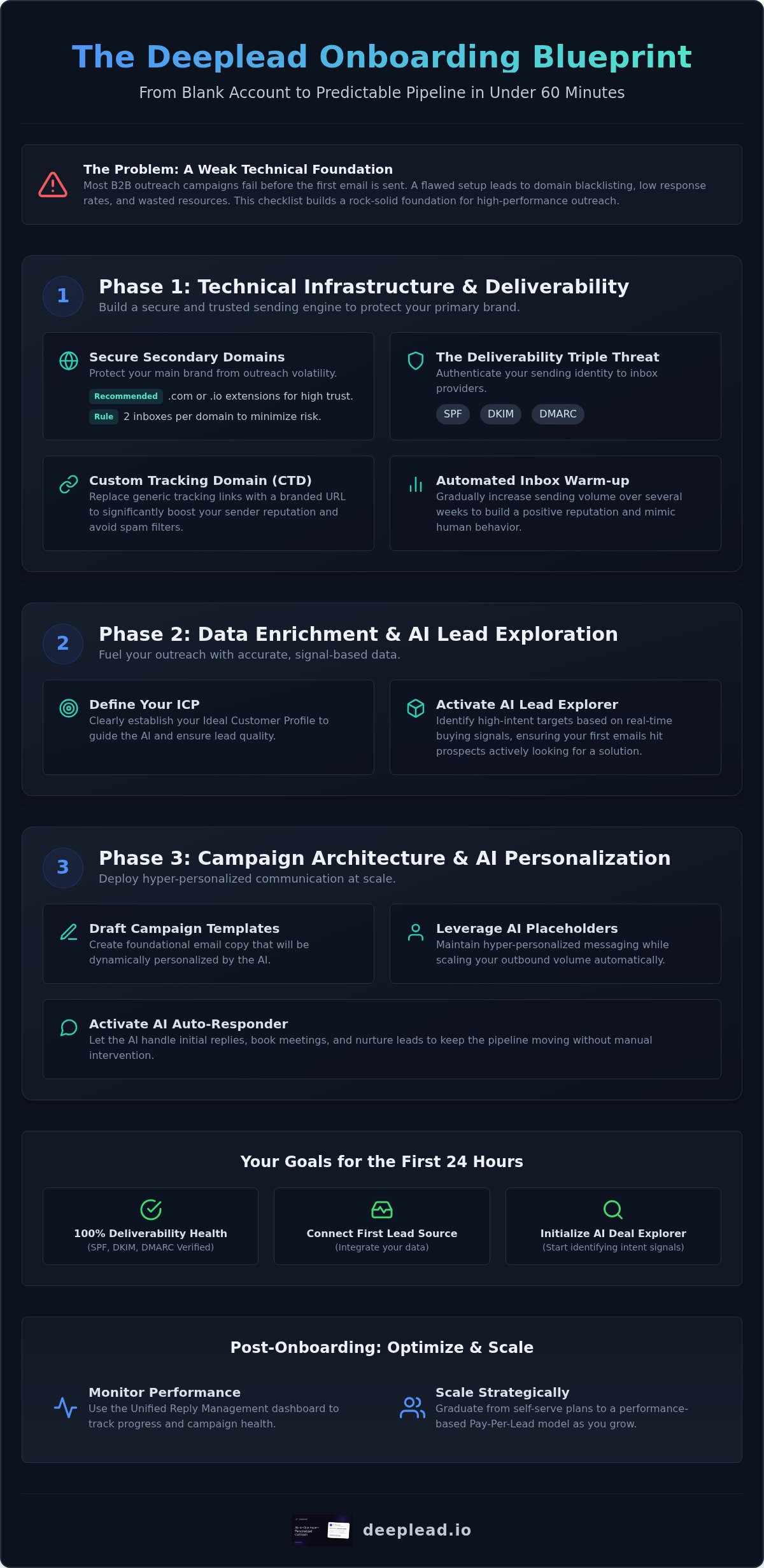
We use a three-phase implementation framework to get you running without the friction of fragmented tools:
- Phase 1: Technical Infrastructure. Secure your domains and verify DNS records.
- Phase 2: Data Enrichment. Define your Ideal Customer Profile (ICP) and identify high-intent targets.
- Phase 3: Campaign Architecture. Draft templates and activate the AI Auto-Responder.
The Consequences of Improper Implementation
Improper setup leads to immediate friction. Domain blacklisting is the most severe risk. Once your primary domain is flagged, your internal communications and client emails suffer. Beyond reputation, unverified data causes low response rates. You'll waste expensive AI credits on prospects that don't exist or don't fit your business profile. Precision at the start prevents these costly leaks and ensures every credit spent moves a deal forward.
Your Goals for the First 24 Hours
Speed matters, but accuracy matters more. Within your first day, aim for 100% deliverability health. This means your SPF, DKIM, and DMARC records are verified and active. Next, connect your first lead source to the platform. Finally, initialize the AI Deal Explorer. This tool identifies intent signals so your first batch of emails hits prospects who are actually looking for a solution. Accomplishing these three tasks sets the momentum for predictable, automated pipeline growth.
Phase 1: Technical Infrastructure and Deliverability Setup
Secondary domains are non-negotiable for modern outreach. They protect your primary brand from volatility and ensure your main corporate email stays clean. This is the first milestone in your Deeplead onboarding checklist. Using these domains ensures you maintain CAN-SPAM Act compliance by providing clear sender identification without risking your primary reputation. You'll build a separate sending history that doesn't impact your day-to-day business operations or internal communication.
Domain and Inbox Procurement
We recommend .com or .io extensions for your secondary domains. These carry the highest trust scores with major providers and are less likely to be flagged as suspicious. Stick to the "2 inboxes per domain" rule. Overloading a single domain with too many sending accounts increases the risk of a total block if one account is reported. For naming, use simple variations like "first.last@domain.com" or "first.initial@domain.com". This looks professional and keeps your identity clear to prospects. It also prevents your outreach from looking like a mass-market automated blast.
The Deliverability Triple Threat: SPF, DKIM, DMARC
Setting up DNS records is the most critical technical step. For Google Workspace, you'll need to add a TXT record for SPF. For Outlook, you'll configure your CNAME records for DKIM. These records prove to the receiving server that you are who you say you are. If these are missing, your emails will likely be rejected or routed to the junk folder. Deeplead includes a built-in validator to confirm these records are active before you send a single message. This feature eliminates the guesswork and technical anxiety associated with manual checks. DMARC is the final gatekeeper for inbox placement.
After DNS validation, you must verify your Custom Tracking Domain (CTD). A CTD replaces generic tracking links with your own branded URL. This significantly boosts your reputation with spam filters. It removes the "third-party" footprint that often triggers security warnings. Finally, initiate the automated warm-up protocol within the Deeplead interface. Our system handles this in the background, gradually increasing your sending volume over several weeks to mimic human behavior. This slow ramp-up builds the necessary trust with inbox providers like Gmail and Microsoft. Skipping this step often leads to immediate blacklisting, even with perfect DNS records. You can start setting up your infrastructure today to ensure your emails actually reach the inbox.
Phase 2: Data Enrichment and AI Lead Exploration
Technical infrastructure is the foundation. Data is the fuel. If your list is filled with generic addresses or defunct companies, your carefully warmed-up inboxes will quickly lose their reputation. This second phase of the Deeplead onboarding checklist ensures your outreach engine runs on high-octane intent data rather than guesswork. Most teams fail because they use static, scraped lists that trigger spam filters. We replace that legacy approach with dynamic, signal-based prospecting.
Start by defining your Ideal Customer Profile (ICP) directly within the interface. Don't just target broad industries; target specific behaviors and tech stacks. Use the AI Lead Explorer to surface targets based on real-time triggers. You can set up signal-triggered alerts for buying intent, such as a prospect's company adopting a specific software or receiving new investment. This allows you to reach out when the window of opportunity is widest. Once you've identified these targets, run our bulk data cleaning workflow. This process verifies every email in real-time to protect your sender score from the damage caused by hard bounces.
Building Your High-Intent Lead List
Precision beats volume. Use our filters to drill down into technographics and recent funding signals. If a company just raised capital, they have the budget and the immediate need for new solutions. Utilize the AI Deal Explorer to identify "lookalike" customers based on your existing best-performing accounts. This tool analyzes your successful deals to find prospects with similar digital footprints. Before any campaign goes live, export your list through the internal verification tool. We aim for a 0% bounce rate. Verifying data at the source prevents your account from being flagged by providers like Google or Microsoft for suspicious activity.
Mapping Data to AI Personalization Fields
Personalization requires structured data. Identify the "Custom Variables" you want the AI to research for each prospect. This might include their latest LinkedIn post, a recent company press release, or specific job hiring trends. Connecting these live signals to your list ensures your templates feel human and relevant. Data hygiene is critical here. Ensure your fields are clean of "Inc.", "LLC", or all-caps names. Clean data allows for seamless template insertion. When the AI researches a prospect, it uses these clean anchors to draft copy that resonates. This level of detail transforms a standard cold email into a bespoke business proposition that earns a reply.
Phase 3: Campaign Architecture and AI Personalization
Infrastructure and data are set. Now you must build the campaign architecture that turns prospects into qualified meetings. This phase of the Deeplead onboarding checklist focuses on the actual message delivery and response management. You aren't just sending emails; you're orchestrating a series of high-intent touchpoints. The goal is to maximize relevance while minimizing manual labor. By using a "Master Template" with AI placeholders, you ensure that every recipient feels you've done your homework.
Efficiency doesn't mean sacrificing quality. Use the AI Auto-Responder to handle qualified replies instantly. If a prospect asks for more information or a case study, the system can provide it while the lead is still warm. This keeps the conversation moving even when you're away from your desk. Simultaneously, configure A/B testing for your subject lines and CTAs. Testing two variations helps you identify what resonates with your specific audience. Small adjustments in wording often lead to significant improvements in positive reply rates.
The Deeplead AI Writing Engine
The writing engine requires clear input to produce elite copy. Provide "Context" about your offer, including your unique selling points and the specific problem you solve. You can set the tone to Minimalist or Consultative depending on your target persona. Minimalist tones often perform better for technical audiences, while consultative tones work well for professional services. Always review AI-generated snippets for accuracy before launching. This human-in-the-loop approach ensures your brand voice remains consistent. You can configure your first AI campaign in minutes once your context is defined.
Sequence Logic and Sending Schedules
Outreach is a marathon, not a sprint. Configure multi-step follow-up sequences to increase your chances of a reply. Most conversions happen after the third touchpoint, so persistence is key. Set optimal time delays between emails. A three-day gap for the first follow-up is a standard best practice. Use "Stop" triggers to ensure the sequence ends as soon as a lead replies. This prevents awkward automated follow-ups after a conversation has started. Finally, sync all activity to your CRM. Deeplead offers native sync for HubSpot and Salesforce, ensuring your sales pipeline is always up to date without manual data entry.
Post-Onboarding: Optimizing for Performance and Scaling
Completing your initial Deeplead onboarding checklist is a significant milestone, but the work doesn't end at the launch. High-growth outbound sales require constant, data-driven refinement. You've built the engine; now you must tune it for maximum performance. This involves moving beyond the technical setup to analyze how your market actually responds to your AI-generated outreach. In 2026, the most successful teams are those that treat their campaigns as living experiments rather than static broadcasts.
The Unified Reply Management dashboard is your primary tool for this analysis. It centralizes every response from every inbox into a single interface. This view allows you to spot patterns in prospect objections or interests quickly. Simultaneously, monitor your inbox health and rotation. Even with perfect DNS settings, individual inboxes can fluctuate in reputation. Rotating your sending accounts ensures that no single domain carries too much load, preserving your long-term deliverability. Proactive monitoring prevents the sudden drop in volume that often plagues unmanaged campaigns.
Weekly Performance Audits
Sales data requires weekly optimization to stay ahead of the competition. Use your audits to identify "leaky buckets" in your funnel. If your open rates are high but reply rates are low, your CTA or AI personalization likely needs adjustment. Refresh your lead lists regularly to avoid audience fatigue. Sending the same offer to the same segment for months will eventually lead to diminishing returns. Analyze the sentiment of your replies. If the AI Auto-Responder isn't capturing the nuance of a prospect's question, refine your prompts to improve the accuracy of its suggestions.
Transitioning to Managed Outbound
There comes a point where managing the platform yourself becomes a bottleneck for growth. If you find your team spending more time on data pulls than on closing deals, you've outgrown the self-serve model. Deeplead offers a Pay-Per-Lead Outreach model where you pay $50 to $150 per qualified reply. This aligns your costs directly with your pipeline growth. For companies requiring a total hands-off experience, our Done-For-You Outbound service at $3,000/month provides a dedicated team to handle the entire checklist for you. Our experts take over the technical maintenance, data enrichment, and AI prompt engineering. This transition allows you to focus exclusively on the bottom of the funnel while our sophisticated engine works quietly in the background.
Build Your Automated Pipeline Today
Successful B2B outreach in 2026 requires a shift from manual effort to technical precision. By following this Deeplead onboarding checklist, you've bypassed the common pitfalls of domain blacklisting and poor data quality. You now have the framework to secure your infrastructure, identify high-intent prospects, and deploy hyper-personalized campaigns that land in the inbox. The difference between a stalled campaign and a predictable pipeline is the quality of your foundation.
You don't need a fragmented tech stack to achieve elite results. Deeplead provides a streamlined path to growth with a built-in verified database, warmed-up inboxes included in every plan, and AI-powered auto-responders to manage your engagement. It's time to stop fighting with settings and start booking meetings. Launch your first campaign with Deeplead today and watch your outbound engine work quietly in the background. Your next qualified lead is just one automated sequence away.
Frequently Asked Questions
How long does the Deeplead warm-up process take before I can send?
Following the Deeplead onboarding checklist typically requires 14 days for new domains to establish a baseline reputation with major inbox providers. This period allows our automated protocol to gradually increase sending volume without triggering spam filters. If you need to start sooner, Deeplead offers managed sending inboxes and pre-warmed domains as part of our service offerings. This ensures you can skip the waiting period and begin your outreach with high deliverability from day one.
Can I use my primary company email address for Deeplead outreach?
We strongly advise against using your primary company email for cold outreach. High-volume sending carries inherent risks that can impact your main domain's reputation and internal communication. Instead, use secondary domains as outlined in your Deeplead onboarding checklist. This strategy creates a safety barrier for your primary brand. It ensures that your day-to-day business operations remain unaffected while you scale your automated outbound sales engine through dedicated secondary accounts.
What is the difference between the self-serve platform and managed services?
The self-serve platform starts at $37 per month and provides full access to our AI research and sending tools. You handle the strategy and list building yourself. Our managed services, such as the Done-For-You Outbound at $3,000 per month, involve our expert team handling every step of the process. We also offer a Pay-Per-Lead model where you pay $50 to $150 per qualified reply, aligning costs directly with your sales results.
Does Deeplead integrate directly with my existing CRM like HubSpot?
Deeplead features native CRM synchronization with HubSpot, Salesforce, and Pipedrive. This integration ensures that every qualified reply and campaign interaction is automatically logged in your existing sales pipeline. You don't have to manually export data or update lead statuses between platforms. By connecting your CRM, you maintain a single source of truth for your sales team. This automation reduces administrative friction and allows your reps to focus on closing deals.
How does the AI Lead Explorer find leads that other databases miss?
The AI Lead Explorer goes beyond static contact lists by analyzing live buying signals and intent data. It identifies prospects based on specific technographic changes, recent funding rounds, or new job hires. While traditional databases often contain outdated information, our AI Deal Explorer uses real-time research to find lookalike customers that match your highest-performing deals. This ensures your outreach targets prospects who are actively seeking solutions rather than cold contacts with no immediate need.
What happens if my emails start going to the spam folder?
Deeplead includes a built-in validator to monitor your deliverability health in real-time. If our system detects a drop in inbox placement, you should immediately verify your DNS records and Custom Tracking Domain. We recommend utilizing our inbox rotation feature to distribute sending volume across multiple accounts. This prevents any single domain from being overloaded. Our support team can also help you analyze your copy to ensure it doesn't trigger common automated spam filters.
Is there a limit to how many inboxes I can connect to Deeplead?
Our platform is designed for effortless scaling. While individual plans may have specific seat limits, you can connect multiple inboxes to support high-volume campaigns. We recommend following the 2 inboxes per domain rule to maintain the highest safety standards. If you require massive scale, our managed sending inboxes and pre-warmed domains provide a robust infrastructure that handles thousands of daily touchpoints. This flexibility allows you to expand your outreach as your pipeline grows.
How do I set up signal-triggered campaigns for new job changes?
You can set up signal-triggered campaigns by selecting specific intent filters within the AI Lead Explorer. Simply define new job hire as a primary trigger for your target audience. The system will then automatically identify prospects who have recently transitioned into relevant roles. These leads are then fed into your personalized sequences. This approach ensures your message reaches decision-makers during their first 90 days, which is often the most active period for new software procurement.